Python可视化绘图折线图+点图+箱线图+直方图+函数图形+金融烛柱图+3D绘图
2018-05-16 15:27阅读:
1.二维绘图
a. 一维数据集
用 Numpy ndarray 作为数据传入 ply
1.
import numpy as np
import matplotlib as mpl
import matplotlib.pyplot as plt
np.random.seed(1000) y =
np.random.standard_normal(10) print
'y = %s'% y x = range(len(y))
print 'x=%s'% x plt.plot(y)
plt.show() 
2.操纵坐标轴和增加网格及标签的函数
import numpy as np
import matplotlib as mpl
import matplotlib.pyplot as plt
np.random.seed(1000) y =
np.random.standard_normal(10) plt.plot(y.cumsum())
plt.grid(True) ##增加格点
plt.axis('tight') # 坐标轴适应数据量 axis 设置坐标轴
plt.show()
3.plt.xlim 和 plt.ylim 设置每个坐标轴的最小值和最大值
#!/etc/bin/python
#coding=utf-8 import numpy
as np import matplotlib as
mpl import matplotlib.pyplot as plt
np.random.seed(1000) y =
np.random.standard_normal(20)
plt.plot(y.cumsum())
plt.grid(True) ##增加格点
plt.xlim(-1,20)
plt.ylim(np.min(y.cumsum())- 1,
np.max(y.cumsum()) + 1)
plt.show()

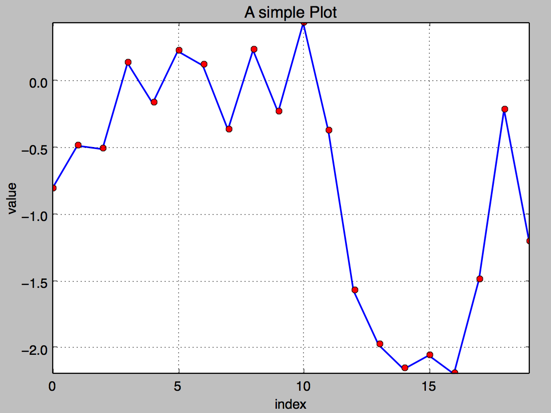
4. 添加标题和标签 plt.title, plt.xlabe, plt.ylabel 离散点, 线
#!/etc/bin/python
#coding=utf-8 import numpy
as np import matplotlib as
mpl import matplotlib.pyplot as plt
np.random.seed(1000) y =
np.random.standard_normal(20)
plt.figure(figsize=(7,4))
#画布大小 plt.plot(y.cumsum(),'b',lw =
1.5) # 蓝色的线
plt.plot(y.cumsum(),'ro') #离散的点
plt.grid(True) plt.axis('tight')
plt.xlabel('index') plt.ylabel('value')
plt.title('A simple Plot') plt.show()
b. 二维数据集
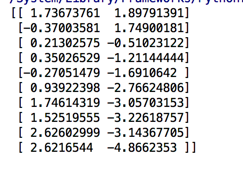
np.random.seed(2000) y =
np.random.standard_normal((10,
2)).cumsum(axis=0) #10行2列
在这个数组上调用cumsum 计算赝本数据在0轴(即第一维)上的总和 print
y
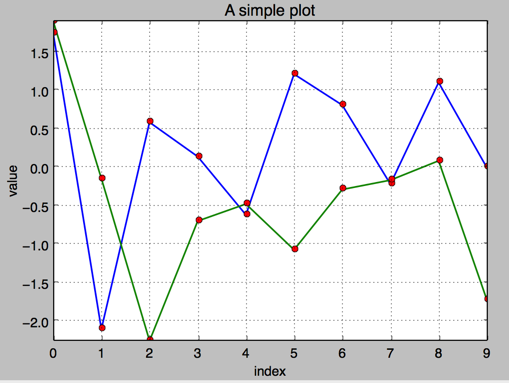
1.两个数据集绘图
#!/etc/bin/python
#coding=utf-8 import numpy
as np import matplotlib as
mpl import matplotlib.pyplot as plt
np.random.seed(2000) y =
np.random.standard_normal((10, 2))
plt.figure(figsize=(7,5)) plt.plot(y, lw
= 1.5) plt.plot(y, 'ro')
plt.grid(True) plt.axis('tight')
plt.xlabel('index') plt.ylabel('value')
plt.title('A simple plot') plt.show()
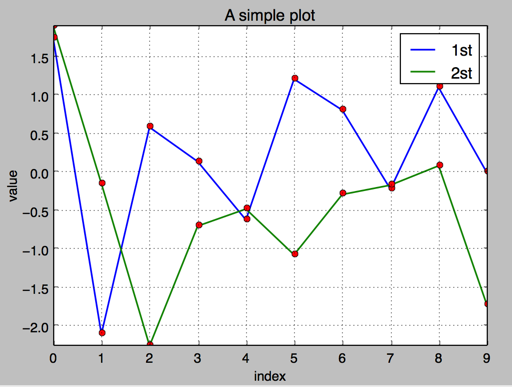
2.添加图例 plt.legend(loc = 0)
#!/etc/bin/python
#coding=utf-8 import numpy
as np import matplotlib as
mpl import matplotlib.pyplot as plt
np.random.seed(2000) y =
np.random.standard_normal((10, 2))
plt.figure(figsize=(7,5))
plt.plot(y[:,0], lw = 1.5,label =
'1st') plt.plot(y[:,1], lw =
1.5, label = '2st') plt.plot(y,
'ro') plt.grid(True) plt.legend(loc =
0) #图例位置自动 plt.axis('tight')
plt.xlabel('index') plt.ylabel('value')
plt.title('A simple plot') plt.show()
3.使用2个 Y轴(左右)fig, ax1 = plt.subplots() ax2 = ax1.twinx()
#!/etc/bin/python
#coding=utf-8 import numpy
as np import matplotlib as
mpl import matplotlib.pyplot as plt
np.random.seed(2000) y =
np.random.standard_normal((10, 2)) fig,
ax1 = plt.subplots() # 关键代码1 plt first data set using first
(left) axis plt.plot(y[:,0], lw =
1.5,label = '1st')
plt.plot(y[:,0], 'ro')
plt.grid(True) plt.legend(loc = 0)
#图例位置自动 plt.axis('tight')
plt.xlabel('index') plt.ylabel('value')
plt.title('A simple plot') ax2 = ax1.twinx()
#关键代码2 plt second data set using second(right) axis
plt.plot(y[:,1],'g', lw =
1.5, label = '2nd')
plt.plot(y[:,1], 'ro') plt.legend(loc =
0) plt.ylabel('value 2nd')
plt.show()

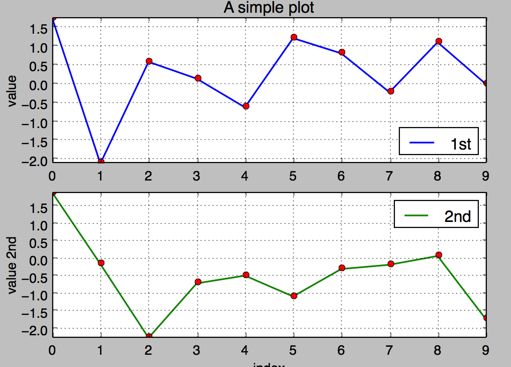
4.使用两个子图(上下,左右)plt.subplot(211)
通过使用 plt.subplots 函数,可以直接访问底层绘图对象,例如可以用它生成和第一个子图共享 x 轴的第二个子图.
#!/etc/bin/python
#coding=utf-8 import numpy
as np import matplotlib as
mpl import matplotlib.pyplot as plt
np.random.seed(2000) y =
np.random.standard_normal((10, 2))
plt.figure(figsize=(7,5))
plt.subplot(211) #两行一列,第一个图
plt.plot(y[:,0], lw = 1.5,label =
'1st') plt.plot(y[:,0],
'ro') plt.grid(True) plt.legend(loc =
0) #图例位置自动 plt.axis('tight')
plt.ylabel('value') plt.title('A simple
plot') plt.subplot(212) #两行一列.第二个图
plt.plot(y[:,1],'g', lw =
1.5, label = '2nd')
plt.plot(y[:,1], 'ro')
plt.grid(True) plt.legend(loc = 0)
plt.xlabel('index') plt.ylabel('value
2nd') plt.axis('tight') plt.show()
5.左右子图
有时候,选择两个不同的图标类型来可视化数据可能是必要的或者是理想的.利用子图方法:
#!/etc/bin/python
#coding=utf-8 import numpy
as np import matplotlib as
mpl import matplotlib.pyplot as plt
np.random.seed(2000) y =
np.random.standard_normal((10, 2))
plt.figure(figsize=(10,5))
plt.subplot(121) #两行一列,第一个图
plt.plot(y[:,0], lw = 1.5,label =
'1st') plt.plot(y[:,0],
'ro') plt.grid(True) plt.legend(loc =
0) #图例位置自动 plt.axis('tight')
plt.xlabel('index') plt.ylabel('value')
plt.title('1st Data Set')
plt.subplot(122) plt.bar(np.arange(len(y)),
y[:,1],width=0.5,
color='g',label = '2nc')
plt.grid(True) plt.legend(loc=0)
plt.axis('tight') plt.xlabel('index')
plt.title('2nd Data Set') plt.show()


