R学习笔记-数据框
2013-08-30 09:45阅读:
文章原文来自于网络:原文地址:
http://www.biostatistic.net/thread-2344-1-1.html
有关数据框的引用:
http://m.oschina.net/blog/102818
一般读取的table都作为数据框使用,所以数据框的使用显得比较重要。这里留下资料,便于以后查看:
数据框(Data frame) 前面我们已经看到一个数据框可以由函数read.
table 间接创建;这里也可以用函数data.frame来创建。数据框中的向
量必须有相同的长度,如果其中有一个比其它的短,它将“循环”整数
次(以使得其长度与其它向量相同):
> x <- 1:4; n <- 10; M <- c(10, 35); y <-
2:4
> data.frame(x, n)
x n
1 1 10
2 2 10
3 3 10
4 4 10
> data.frame(x, M)
x M
1 1 10
2 2 35
3 3 10
4 4 35
> data.frame(x, y)
Error in data.frame(x, y) :
arguments imply differing number of rows: 4, 3
如果一个因子包含在一个数据框中,它必须和其中的向量有相同的长
度。列名也是可以改变的,例如,data.frame(A1=x, A2=n)。用户也
可以使用row.names给行命名,但是,这个命名向量必须是字符型的而
且长度等于这个数据框的行数。最后,注意数据框和矩阵一样有维数这
个属性。
1 访问数据框变量
建议:在read.table命令执行names查看要处理的变量
> names(Squid)
[1] 'Sample'
'Year'
'Month'
'Location' 'Sex'
'GSI'
>
1.1 str函数
str函数可以查看数据框中每个变量的属性:
> str(Squid)
'data.frame':
2644 obs. of
6 variables:
$ Sample
: int
1 2 3 4 5 6 7 8 9 10 ...
$ Year
: int
1 1 1 1 1 1 1 1 1 1
...
$ Month
: int
1 1 1 1 1 1 1 1 1 2 ...
$ Location: int
1 3 1 1 1 1 1 3 3 1 ...
$ Sex
: int
2 2 2 2 2 2 2 2 2 2
...
$ GSI
: num
10.44 9.83 9.74 9.31 8.99
...
>
Sample
,Yead,Month,Location,Sex这几个变量是整型
GSI这个变量是数值型
GSI这个变量是存在于数据框Squid中的,不能通过在R控制台中输入GSI查看
> GSI
错误: 找不到对象'GSI'
>
1.2 函数中的数据参数--访问数据框中的变量的最佳方式
> M1 <- lm(GSI ~ factor(Location)+factor(Year),data =
Squid)
> M1
Call:
lm(formula = GSI ~ factor(Location) + factor(Year), data =
Squid)
Coefficients:
(Intercept)
factor(Location)2
factor(Location)3
factor(Location)4
1.3939
-2.2178
-0.1417
0.3138
factor(Year)2
factor(Year)3
factor(Year)4
1.3548
0.9564
1.2270
>
lm 是做线性回归的函数,data = Squid表示从数据框Squid中取变量
data = 并不是适用于任何函数,eg:
> mean(GSI,data = Squid)
错误于mean(GSI, data = Squid) : 找不到对象'GSI'
>
1.3 $ 符号 访问变量的另外一种方法
Squid$GSI
> Squid$GSI
[1] 10.4432
9.8331
9.7356
9.3107
8.9926
8.7707
8.2576
7.4045
[9]
7.2156
6.8372
6.3882
6.3672
6.2998
6.0726
5.8395
5.8070
[17]
5.7774
5.7757
5.6484
5.6141
5.6017
5.5510
5.3110
5.2970
[25]
5.2253
5.1667
5.1405
5.1292
5.0782
5.0612
5.0097
4.9745
或者
Squid[,6]
> Squid[,6]
[1] 10.4432
9.8331
9.7356
9.3107
8.9926
8.7707
8.2576
7.4045
[9]
7.2156
6.8372
6.3882
6.3672
6.2998
6.0726
5.8395
5.8070
[17]
5.7774
5.7757
5.6484
5.6141
5.6017
5.5510
5.3110
5.2970
[25]
5.2253
5.1667
5.1405
5.1292
5.0782
5.0612
5.0097
4.9745
此时可以通过mean求平均值
> mean(Squid$GSI)
[1] 2.187034
>
1.4 attach 函数
attach函数将数据框添加到R的搜索路径中,此时就可以通过GSI命令直接查看GSI数据
> attach(Squid)
> GSI
[1] 10.4432
9.8331
9.7356
9.3107
8.9926
8.7707
8.2576
7.4045
[9]
7.2156
6.8372
6.3882
6.3672
6.2998
6.0726
5.8395
5.8070
[17]
5.7774
5.7757
5.6484
5.6141
5.6017
5.5510
5.3110
5.2970
[25]
5.2253
5.1667
5.1405
5.1292
5.0782
5.0612
5.0097
4.9745
此时就可以直接使用相关函数了。
> boxplot(GSI)
>
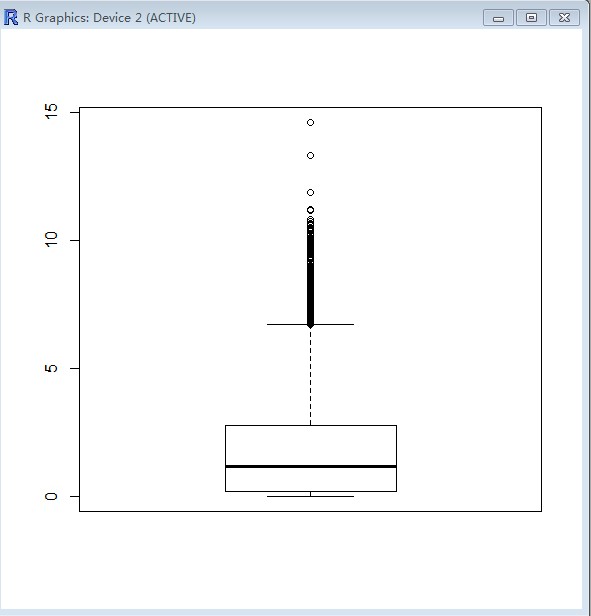
(额、、看不懂这个图)
使用attach函数显然应该小心保证变量名字的唯一性,如果与R自带函数名字或者变量一样肯定会出问题。
attach使用总结:
(1)为了避免复制变量,避免输入Squid$GSI两次以上
(2)使用attach命令应该保证变量的唯一性
(3)如果要处理多个数据集,而且一次只处理一个数据集,使用detach函数将数据集从R搜索路径中删除
2 访问数据集
首先执行detach(Squid)命令!!!
查看Squid中Sex的值
> Squid$Sex
[1] 2 2 2 2 2 2 2 2 2 2 2 2 2 2 2 2 2 2 2 2 2 2 2 1
2 2 2 2 2 2 2 2 2 2 2
[36] 2 2 2 2 2 2 2 2 2 2 2 2 1 2 2 2 2 2 2 2 2 2 1 2 1 1 1
1 2 1 1 1 1 1 1
显示位移值
> unique(Squid$Sex)
[1] 2 1
>
其中1表示雄性2表示雌性
> Sel <- Squid$Sex == 1
> SquidM <- Squid[Sel,]
> SquidM
Sample Year Month Location Sex
GSI
24
24
1
5
1
1 5.2970
48
48
1
5
3
1 4.2968
58
58
1
6
1
1 3.5008
60
60
1
6
1
1 3.2487
61
61
1
6
1
1 3.2304
Sel <- Squid$Sex ==
1这条命令生成一个向量与Sex具有相同的长度,如果Sex的值等于1则该变量的值为TRUE,否则为FALSE,这样一个变量可称为布尔变量,可以用来选择行。
SquidM <-
Squid[Sel,]这条命令表示选择Squid中Sel等于TRUE的行,并将数据存储到SquidM中。因为是选择行,所以需要使用方阔号。
第三章未完待续...
go
on
获得雌性数据
> SquidF <- Squid[Squid$Sex == 2,]
> SquidF
Sample Year Month Location Sex
GSI
1
1
1
1
1
2 10.4432
2
2
1
1
3
2
9.8331
3
3
1
1
1
2
9.7356
4
4
1
1
1
2
9.3107
5
5
1
1
1
2
8.9926
下面几条命令不解释:
unique(Squid$Location)
Squid123 <- Squid[Squid$Location == 1 | Squid$Location ==2 |
Squid$Location == 3,]
Squid123 <- Squid[Squid$Location != 4,]
Squid123 <- Squid[Squid$Location < 4 ,]
Squid123 <- Squid[Squid$Location <=3 ,]
Squid123 <- Squid[Squid$Location >=1 &Squid$Location
<=3 ,]
都是获得Location值为1,2,3的行
> unique(Squid$Location)
[1] 1 3 4 2
> Squid123 <- Squid[Squid$Location == 1 | Squid$Location ==2
| Squid$Location == 3,]
> Squid123
Sample Year Month Location Sex
GSI
1
1
1
1
1
2 10.4432
2
2
1
1
3
2
9.8331
3
3
1
1
1
2
9.7356
4
4
1
1
1
2
9.3107
5
5
1
1
1
2
8.9926
6
6
1
1
1
2
8.7707
获得Location值为1的雄性数据行
> SquidM.1 <- Squid[Squid$Sex == 1 & Squid$Location ==
1,]
> SquidM.1
Sample Year Month Location Sex
GSI
24
24
1
5
1
1 5.2970
58
58
1
6
1
1 3.5008
60
60
1
6
1
1 3.2487
获得位置为1或2的雄性数据
> SquidM.12 <- Squid[Squid$Sex == 1 &( Squid$Location ==
1 | Squid$Location == 2),]
> SquidM.12
Sample Year Month Location Sex
GSI
24
24
1
5
1
1 5.2970
58
58
1
6
1
1 3.5008
60
60
1
6
1
1 3.2487
注意!:
> SquidM1 <- SquidM[Squid$Location == 1,]
> SquidM1
Sample Year Month Location
Sex GSI
24 24 1
5 1 1 5.2970
58 58 1
6 1 1 3.5008
..........
..........
NA
NA
NA
NA

