新浪博客


Multiple
Windows includes the “netsh” command which allows you to configure
just about any aspect of your network connections. If you view the
accepted parameters using “netsh /?” you will be presented with a
list of commands each which have their own list of commands (and so
on). For the purpose of adding IP addresses, we are interested i n this string of parameters:
If you view the help information, you can see the full list of accepted parameters but for the most part what you will be interested in is something like this:

Now run netsh from within a FOR /L loop to add IP’s 192.168.1.10-20 to this adapter:

After all, if the issue is still remaining, you can have skipassource switch to skip it register itself to DNS:
netsh interface ipv4 add addressNote: For Windows Server 2003/XP and earlier, “ipv4” should be replaced with just “ip” in the netsh command.
If you view the help information, you can see the full list of accepted parameters but for the most part what you will be interested in is something like this:
netsh interface ipv4 add address “Local Area Connection” 192.168.1.2 255.255.255.0The above command adds the IP Address 192.168.1.2 (with Subnet Mask 255.255.255.0) to the connection titled “Local Area Network”.
Adding Multiple IP Addresses at Once
When we accompany a netsh command with the FOR /L loop, we can quickly add multiple IP addresses. The syntax for the FOR /L loop looks like this:FOR /L %variable IN (start,step,end) DO commandSo we could easily add every IP address from an entire subnet using this command:
FOR /L %A IN (0,1,255) DO netsh interface ipv4 add address “Local Area Connection” 192.168.1.%A 255.255.255.0This command takes about 20 seconds to run, where adding the same number of IP addresses manually would take significantly longer.
A Quick Demonstration
Here is the initial configuration on our network adapter:ipconfig /all

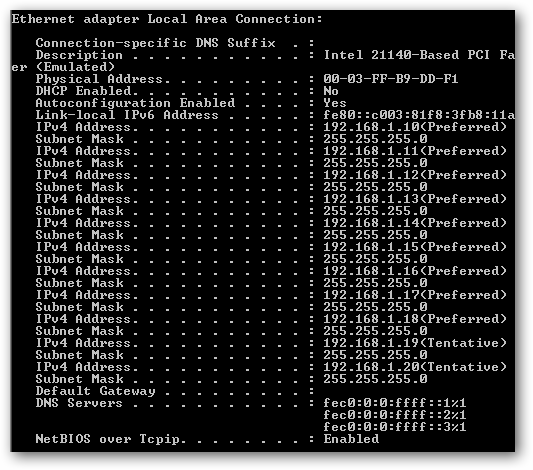
Now run netsh from within a FOR /L loop to add IP’s 192.168.1.10-20 to this adapter:
FOR /L %A IN (10,1,20) DO netsh interface ipv4 add address “Local Area Connection” 192.168.1.%A 255.255.255.0After the above command is run, viewing the IP Configuration of the adapter now shows:
After all, if the issue is still remaining, you can have skipassource switch to skip it register itself to DNS:
Netsh Int IPv4 Add Address SkipAsSource=TrueAnd use the following command to verify it. the issue should be fixed.
netsh int ipv4 show ipaddresses level=verbose